
Best PDF Viewer Plugins for Elementor: Top Choices for 2026


In this post, we compare best PDF viewer Plugins for Elementor based on ease of use, features, performance, and pricing. We tested each plugin hands-on to share a clear and honest view from every angle. This helps you choose the best PDF viewer for your WordPress site with confidence.
Key Takeaways
The best PDF viewer plugins for Elementor are Custom iFrame, Unlimited Elements, EmbedPress, PDF Smart Viewer, and Happy Addons.
Each plugin offers a similar way to display PDFs, with different controls, design options, and performance levels. Some plugins are free, some follow a freemium model, and others require a paid plan with higher pricing. The right choice depends on your budget, features you need, and how much control you want over your PDF embeds.
Here is a comparison table:
| PDF Embed Key Features | Custom iFrame | EmbedPress | Smart PDF Viewer | Unlimited Addons | Happy Addons |
| Disable Print/Download | Yes | Yes (Pro) | Yes | No | No |
| Toolbar | Yes | Yes (Pro) | No | No | No |
| Disable Copy Text | Yes | Yes (Pro) | No | No | No |
| Add Text | Yes | Yes (Pro) | No | No | No |
| Draw | Yes | Yes (Pro) | No | No | No |
| Horizontal Scrolling | Yes | Yes (Pro) | No | No | No |
| Selection Tool | Yes | Yes (Pro) | No | No | No |
| Content Protection | No | Yes (Pro) | No | No | No |
| Custom Branding | Yes (Pro) | Yes (Pro) | No | No | No |
| 3D Flip book | Yes (Pro) | Yes (Pro) | No | No | No |
| Device Frame | Yes (Pro) | No | No | No | No |
| Plugin | PDF Feature | Download |
| Custom iFrame for Elementor | Freemium | Get it Now |
| Unlimited Elements | Freemium | Get it Now |
| EmbedPress | Freemium | Get it Now |
| PDF Smart Viewer for Elementor | Free | Get it Now |
| Happy Addons | Free | Get it Now |
Here are the PDF viewer plugins for Elementor I tested, explained one by one.
Best PDF Viewer Plugins for Elementor Plugins
I reviewed each plugin from every angle. This includes active installations, user ratings, free features, pro features, pricing and ease of use. I also looked at performance, flexibility, and how well each plugin fits real-world Elementor websites.
1. Custom iFrame for Elementor
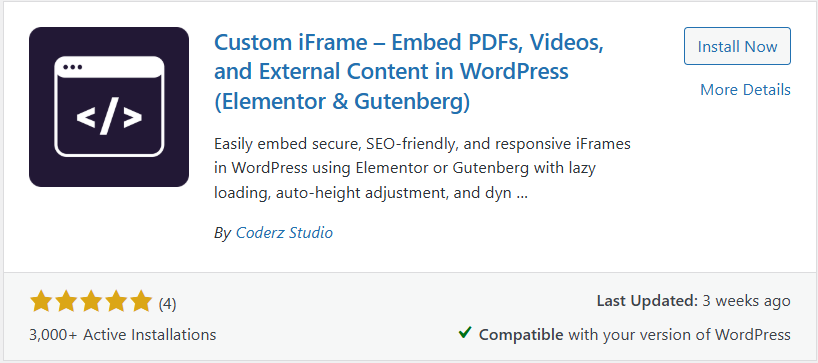
Custom iFrame is a powerful embedding plugin. It lets you embed PDFs, videos, audio files, documents, social media posts, and more. It supports over 100 external sources. You only need a URL to get started.
PDF Embed Features in Custom iFrame
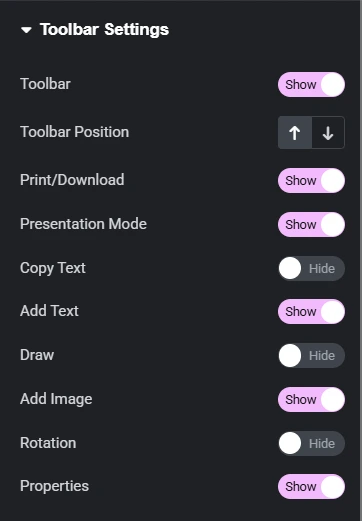
Custom iFrame offers full control when you embed PDFs in Elementor. You can easily match the PDF viewer with your site design.
Key features include:
- Display options to control layout, background, and appearance
- Toolbar controls to manage user actions
- Enable or disable copy, print, rotate, zoom, or text selection
- Keep the PDF clean and user friendly
All of these features are available in the free version of the plugin. This makes it a strong choice even without upgrading.
Custom iFrame Pro Features for PDF Viewer
The Pro version adds advanced features for better security and engagement.
- PDF Watermark: Add text or image watermarks to protect your content. Use your brand name or logo to prevent misuse.
- Device Frames: Show PDFs inside desktop, tablet, or mobile frames. This is useful for demos, previews, or design showcases.
- 3D Flipbook View: Display PDFs as a page turning flipbook. This makes documents more interactive and engaging.
Custom iFrame Pricing
The free version of Custom iFrame is available on WordPress.org. It includes all core PDF embed features.
The Pro version uses a lifetime pricing model:
- Plans start from $49 and go up to $249 (Custom iFrame is often available at a discounted price during promotions.)
- One time payment
- Lifetime updates
- Lifetime support
Custom iFrame’s PDF Embed Pros & Cons
| Pros | Cons |
| The free version includes extensive PDF viewer features. | Advanced features like watermark, device frames, and 3D flipbook require Custom iFrame Pro. |
| It offers display controls, toolbar controls, and responsive settings. | It focuses only on embedding, so it does not replace large Elementor addon packs. |
| The pro version offers one-time lifetime pricing, not yearly renewals | Users looking for all-in-one Elementor addons may need separate plugins |
| It supports 100+ embed sources like PDFs, videos, maps, forms, and websites | |
| Built-in sandbox and security options help protect embedded content | |
| The plugin stays lightweight and avoids feature bloat |
This makes Custom iFrame one of the most affordable PDF viewer plugins for Elementor, especially when compared to yearly subscriptions.
2. Unlimited Elements for Elementor
Unlimited Elements is a popular Elementor addon plugin. It comes with more than 200 widgets for different use cases. One of those widgets is a PDF Viewer. This makes it an option if you already use the plugin and want basic PDF embeds.
The PDF Viewer widget is available in the free version but the features are limited.
PDF Viewer Features in the Unlimited Elements Free Version
- Supports PDF files only through a PDF URL
- Includes a full screen view option
- Offers a single spacing control
These features are fine for simple needs. But they may feel restrictive if you want more control over how the PDF looks or behaves.
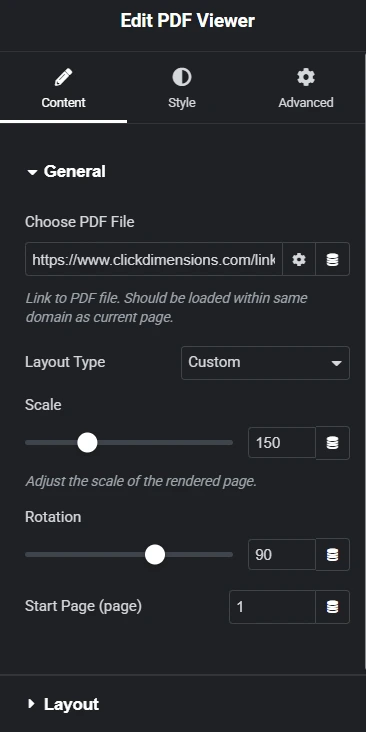
PDF Viewer Features in Unlimited Elements Pro
With the Pro version, you get more control over the PDF viewer.
- Custom layout options like scale, rotate, and start page.
- Options to show or hide previous and next arrows.
- Page number display controls.
- Basic styling options for navigation and layout.
These features improve usability. They are helpful if you want more interaction with the PDF.
Unlimited Elements Pricing
- Free version: Available from the WordPress plugin directory
- Pro version: Starts at $44.10 for one site and one year
- Lifetime plans go up to $524.25 for unlimited sites
Unlimited Elements’ PDF Viewer widget Pros & Cons:
| Pros | Cons |
| You get many extra Elementor widgets with one plugin | Unlimited Elements is a large Elementor addon plugin, which can add extra load if you only need a PDF viewer |
| Useful if you already need multiple widgets | The PDF Viewer widget has limited controls compared to dedicated PDF embed plugins |
| The Pro version follows a yearly pricing model for most plans, which can become costly over time | |
| You pay for a full widget bundle, even if your main need is only PDF viewing in Elementor |
Unlimited Elements works best if you want a large widget library. If your main goal is PDF viewing, it may feel more than you need.
3. EmbedPress
EmbedPress is a popular WordPress plugin for embedding many types of content. It supports videos, maps, social posts, documents, and more. It also includes a PDF embed feature for Elementor users.
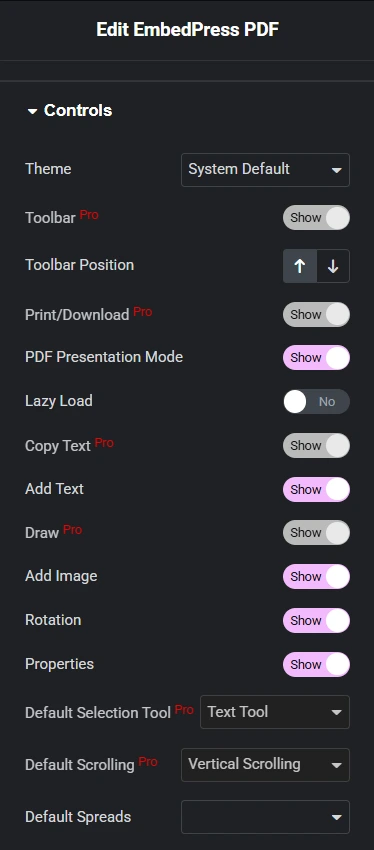
The PDF viewer in EmbedPress follows a freemium model. Basic features are free. Advanced controls require the Pro version.
PDF Viewer Features in EmbedPress Free
- Basic PDF display options like zoom and alignment
- Presentation mode for PDFs
- Add text and image tools
- Page rotation options
- Simple viewer layout inside Elementor
These features work well for simple PDF display needs.
PDF Viewer Features in EmbedPress Pro
- Full toolbar control for PDFs
- Enable or disable print and download
- Text selection control
- Default scrolling options
- Password protection for PDFs
- Custom branding with watermark
The Pro version gives better control and protection for PDF files.
EmbedPress Pricing
- Free version is available on WordPress.org
- Pro pricing starts at $55 per year for 1 site
- Lifetime unlimited plan goes up to $299
The pricing follows a yearly subscription model for most plans.
EmbedPress PDF Viewer Pros & Cons
| Pros | Cons |
| Supports many embed types in one plugin. | Many important PDF controls are locked behind Pro. |
| Good set of PDF tools in the Pro version. | Yearly pricing can get expensive over time. |
| Regular updates and large user base. | Includes many features users may not need. |
| Heavier plugin compared to focused embed tools. |
This makes EmbedPress a solid option for users who want an all-in-one embed solution, but it may feel heavy or costly if your main goal is PDF viewing only.
4. PDF Smart Viewer for Elementor
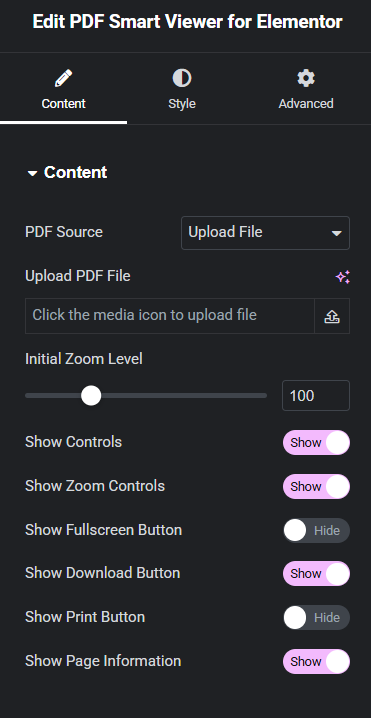
PDF Smart Viewer is a simple and focused PDF viewer plugin for Elementor. It is built only for displaying PDFs.
The plugin is free to use and easy to set up.
It works well if you need a basic and clean PDF viewing experience inside Elementor. There are no extra embed features or unrelated tools.
Key Features
- Zoom controls with smooth scaling from 25% to 300%
- Fullscreen mode for distraction-free reading
- One-click download and print options
- Simple page navigation with previous and next buttons
- Styling options to match your site design
All of these features are available in the free version.
PDF Smart Viewer Pros & Cons
| Pros | Cons |
| Dedicated PDF viewer for Elementor | No advanced features like 3D flipbook |
| Free to use with no feature lock | No PDF protection options like watermark or password |
| Includes all essential PDF controls | Supports only PDF files and no support for other embed types |
| Lightweight plugin with simple setup |
PDF Smart Viewer is a good option if you only need a basic PDF viewer and want a free, no-frills solution for Elementor.
5. Happy Addons
Happy Addons is a popular Elementor addon plugin. It offers a wide set of widgets and design tools. This includes header and footer builder, single post templates, and archive pages. The plugin comes with over 143 widgets and many extra features.
Among these widgets, Happy Addons also includes a PDF View widget.
Happy Addons follows a freemium model. The good part is that the PDF View widget is available in the free version.
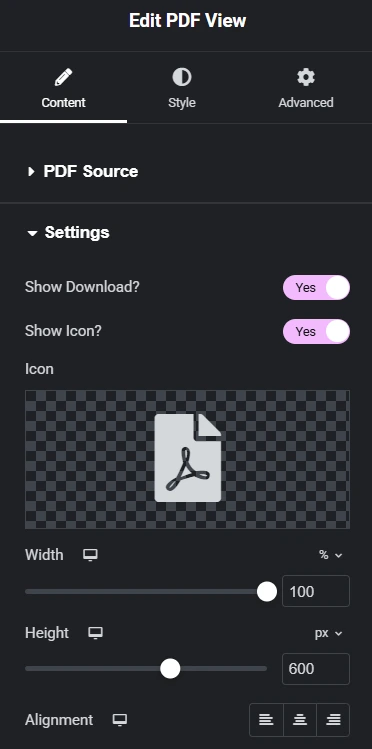
Happy Addons PDF View Key Features
- Field to add a PDF title
- Option to show a separate download button
- Basic alignment controls
- Simple styling options to match the layout
These features work well for basic PDF display needs.
Happy Addons PDF View Pros & Cons
| Pros | Cons |
| The PDF View widget is available in the free version | Very limited PDF controls compared to dedicated PDF viewer plugins |
| Simple setup with minimal configuration | No advanced features like watermark, password protection, or toolbar control |
| Works well for basic use cases | No interactive options such as flipbook or page effects |
| Suitable for users already using Happy Addons widgets | Plugin includes many widgets you may not need. Extra widgets can increase plugin size and site load. |
| Not ideal if your only goal is PDF embed in Elementor. |
Happy Addons works best if you already use its design tools. If your main goal is only PDF viewing, a focused plugin may be a better fit.
Conclusion: The Best PDF Viewer Plugin For Elementor
Choosing the best PDF viewer for Elementor depends on what you really need. Some plugins focus on simple viewing. Others try to do everything at once. After testing all of them, the difference is clear.
If you want a dedicated, flexible, and long-term solution, Custom iFrame stands out. It gives strong PDF controls in the free version. The Pro version adds watermark, protection, and advanced display options with lifetime pricing.
That makes it a smart choice for most WordPress sites.
Unlimited Elements and Happy Addons work well if you already use their ecosystems. But they add extra widgets you may not need. PDF Smart Viewer is good for basic viewing, but it lacks advanced features. EmbedPress offers many tools, but the yearly pricing and feature bloat can be a drawback.
If your goal is clean PDF embedding, full control, and better value over time, Custom iFrame is the better fit.
Try the free version and upgrade only if you need more power.
If this guide helped you, leave a comment below. Tell us which plugin you use and how you plan to display PDFs on your site.
